Members directory
Your organisation's members: organisation memberships, their status, communities and holders.
Studio roles: "Owner" and "Administrator", and Studio users with a permission set that holds "Community: read" or "Community: manage". Without "Community: manage" they find members without changing their memberships. Other Studio users do not see "Members directory" in the sidebar. Permissions lists which permission each page and action needs.
The members directory lists your organisation's members: "Everyone who has onboarded as a member, with the names their register gives. Their status and communities follow from their last membership check."
Organisation memberships
Each row is an organisation membership: the record that a member code belongs to a verified member of your organisation. "An organisation membership is created when someone onboards through Login with appsolut and a register confirms them."
- One per member code, one per person. A member code has at most one organisation membership, and a frontend user holds at most one.
- Names from the register. The directory shows the names the deciding register gives, never the names a person typed into their own account.
- A holder. The membership is held by one frontend user, the person's account for your frontends. If that account is deleted, the membership stays without a holder, and the next person to onboard with the member code takes it over.
Registers and memberships are separate: a person in a register is not a member until they onboard, and a membership stays after their entry is deactivated. It is then simply no longer valid.
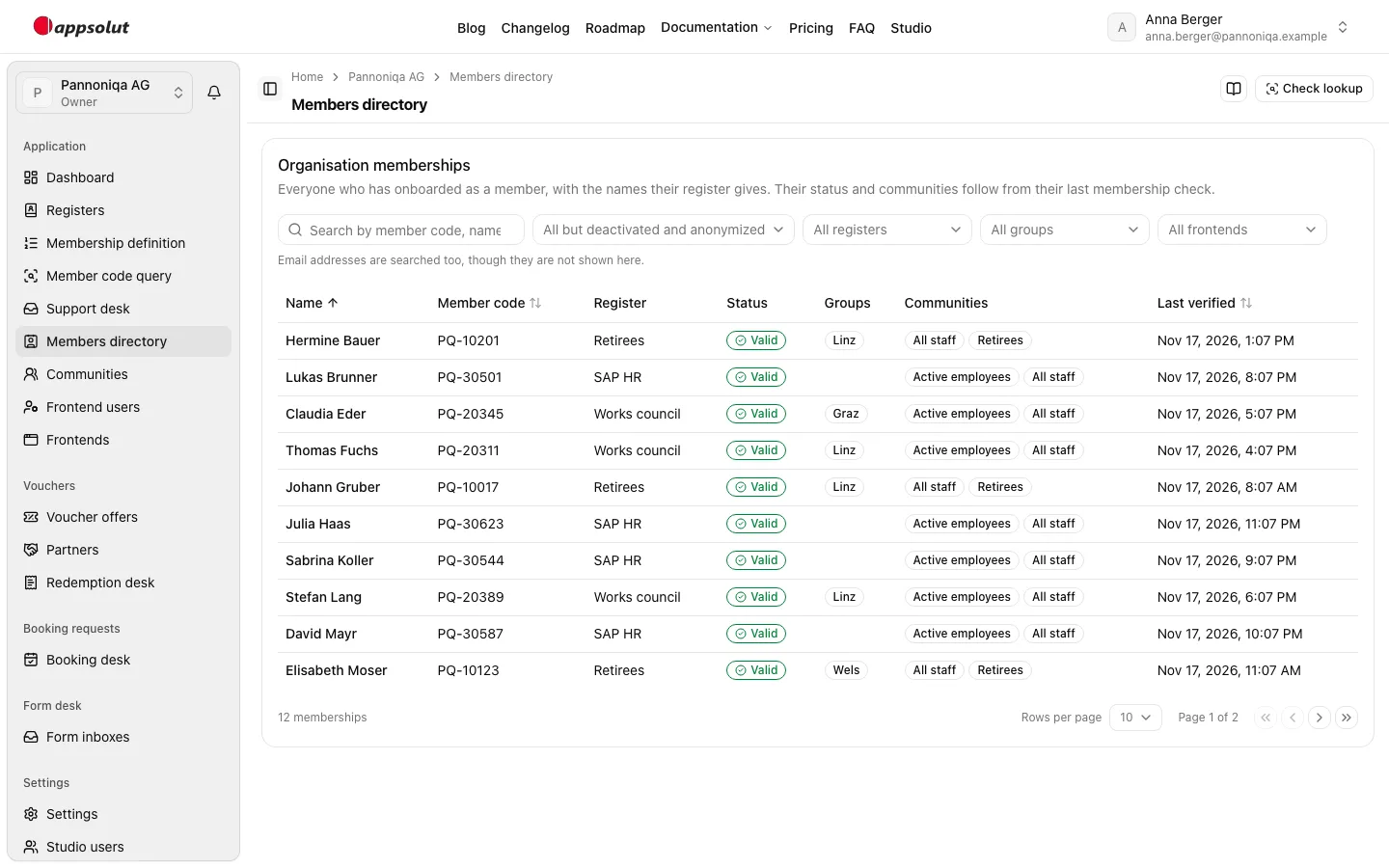
Status
A membership's status follows from its last membership check:
- "Valid": the last check found the person eligible.
- "Valid, on grace": "The register could not answer at the last check; the last valid check counts for 7 days". See the grace rule.
- "Not valid": with the reason, for example "Not valid: not found" when no register finds the member code any more, "blocked" when a register refuses them, "filtered out" when a register finds them but none lets them in (it does not count their status, or its filters do not match), or "register unavailable, grace expired".
- "Deactivated": a Studio user switched the membership off. See Deactivate a membership.
- "Anonymized": everything that identifies the person was erased.
A membership that is not valid stays linked to its holder. The next valid check, at the person's next sign-in, makes it valid again.
Communities
The "Communities" column shows the communities a valid member belongs to. A community shown with a question mark is unknown: it needs a claim the membership has not stored yet. See Communities.
Relinks
A membership is linked to the register entry that last decided it. When another entry or another register decides at a login check, for example after Pannoniqa moved a works council member to "Retirees", the Studio relinks the membership on its own. The member's history shows "Relinked", marked "Automatic".